
What is harness engineering? The part of AI agents most people miss
Every AI agent is a model plus a harness. This guide explains what the harness is, how it relates to prompt and context engineering, and how you would design one for a coding agent, with a real benchmark that shows why it matters.
 7:36Prefer to watch?Watch the 7:36 videoWatch on YouTube
 On this page
- 🧩 Agent = Model + Harness
- 💬 You've already used a harness
- ✍️ Prompt engineering and context engineering
- Prompt engineering: the instructions
- Context engineering: what the model gets to see
- 🧰 What counts as the harness
- 🚫 What a model can't do on its own
- Try it: memory
- Try it: web search
- 🛠️ Designing a harness for a coding agent
- 📁 Work with real code: a file system and Git
- 💻 Solve problems you didn't plan for: bash
- 📦 Do it safely: a sandbox
- 🧠 Remember things and know new stuff: memory files, search and MCP
- ✂️ Stay sharp in long sessions: fighting context rot
- 🔁 Work on big tasks for hours: planning, loops and self-checks
- 🔄 The Ralph loop: how agents keep going
- 📊 The proof: same model, different harness
- 🔮 Will harnesses matter less as models improve?
- ❓ Quick answers
- 🧭 Where to go from here
There is a benchmark called Terminal Bench where AI agents get real tasks to solve inside a terminal. On its 2.0 leaderboard, the exact same model, Claude Opus 4.6, scored 76.4% in one setup and 58.0% in another. Same brain, same test, very different score.
If the model was not the difference, what was? The harness. This guide is the written version of my video on harness engineering. It explains what a harness is, what counts as one, and how you would design one for a coding agent, in plain language.
🧩 Agent = Model + Harness
Every AI agent is made of two pieces: a model and a harness.
The model is the part everyone talks about: Claude, GPT, Gemini. The harness is everything around it. And it matters far more than it usually gets credit for.
Think of an amazing chef. Now put that chef in an empty room. No stove, no knives, no fridge, no ingredients. How much can they cook? Nothing. The talent is there, but there is nothing to work with.
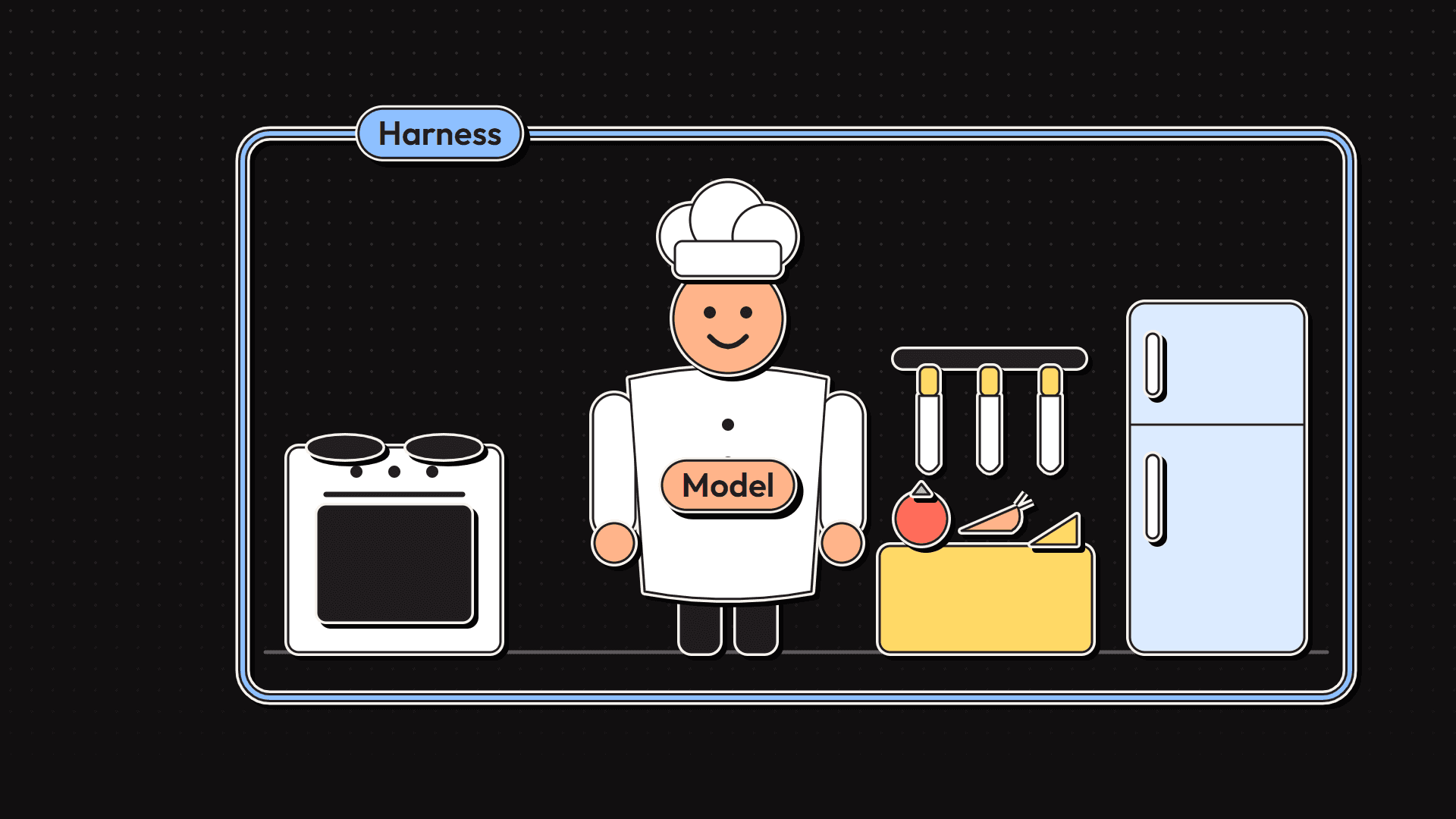
The model is the chef. The harness is the kitchen. Put simply:
If it's not the model, it's the harness.
💬 You've already used a harness
You have probably used a harness today without noticing.
When you chat with an AI, the model does not actually remember your last message. Every time you hit send, the app quietly takes the whole conversation so far and sends all of it to the model again. Keep the history, add the new message, send it all.
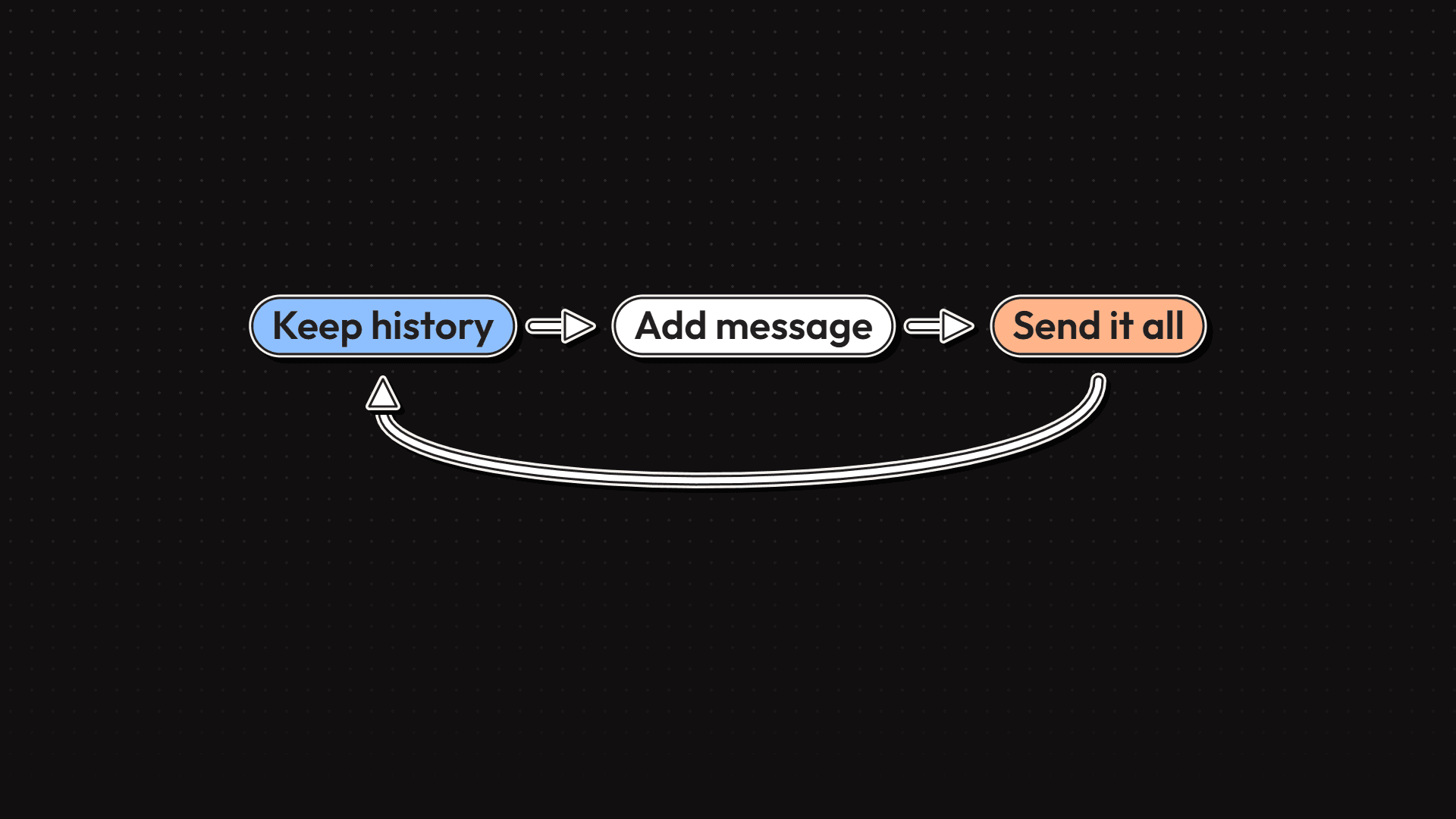
That little loop is a harness. A tiny one, but it is the reason a model feels like something you can have a conversation with. Take it away and every message would be the first message.
✍️ Prompt engineering and context engineering
Before "harness engineering" became a term, you probably heard two others. Both of them live inside the harness, so here is a quick recap.
Prompt engineering: the instructions
Prompt engineering is about the instructions you give the model: the system prompt, a few examples, the format you want back. A shopping assistant might be told to help people shop and politely say no to anything else. Models follow instructions like this pretty well, but not perfectly. A clever user can sometimes talk them out of it.
If you want to see what serious prompt engineering looks like, read the system prompt of opencode, an open source coding agent. It covers how to talk, how to use tools and what not to do, and it is long. All of it is prompt engineering.
Context engineering: what the model gets to see
Context engineering is about what information the model sees at each step.
In 2023, GPT-4 launched with a context window of about 8,000 tokens, roughly six thousand words. Long conversations ran out of room fast, and a common trick was to summarize the older messages to make space. The problem is that summaries lose details, and sometimes the detail that got dropped was exactly the one you needed.
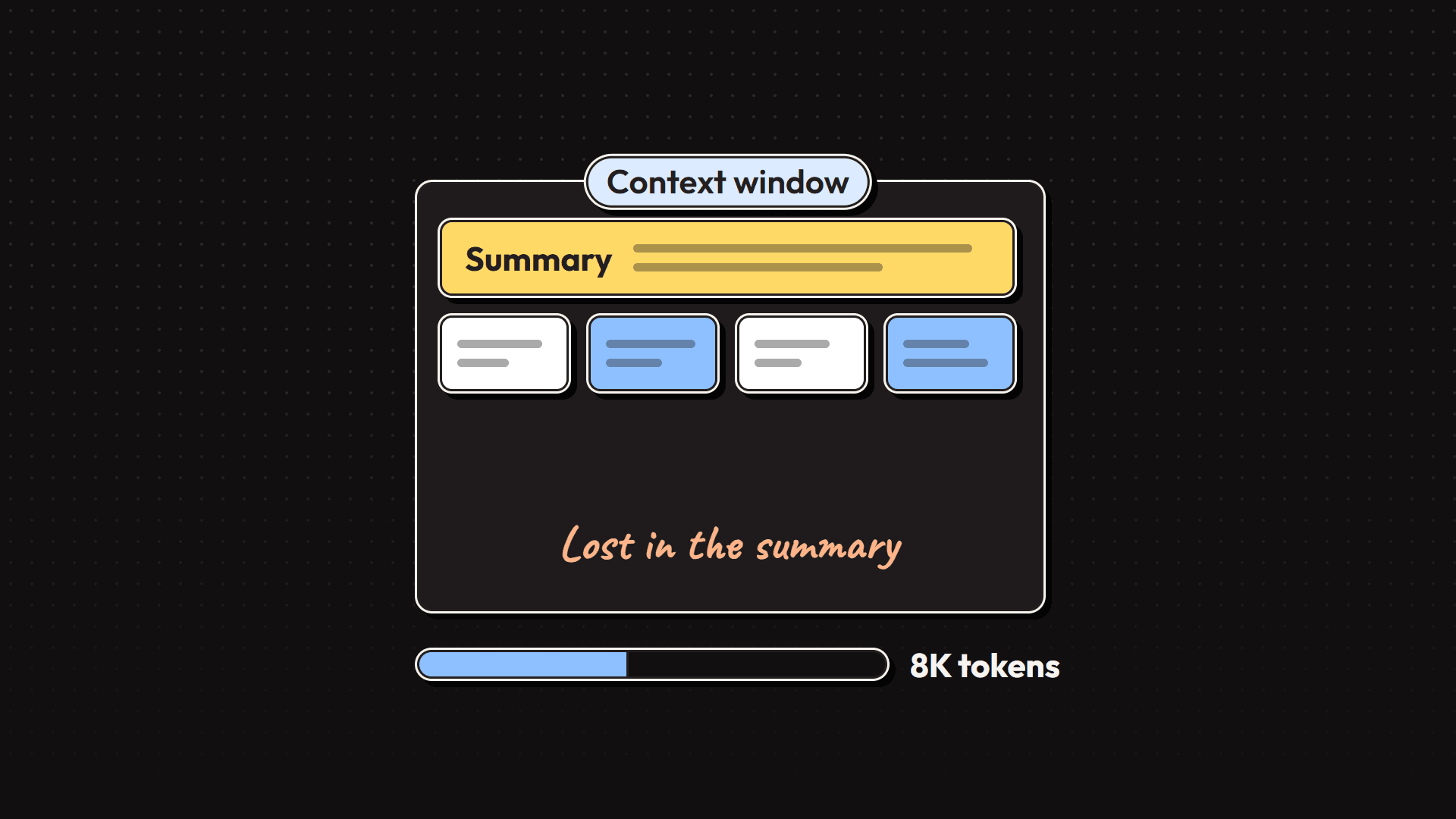
Bigger windows did not make the problem go away. Models actually get worse when their context is full of material that is not relevant to the task. There is a name for this: context rot.
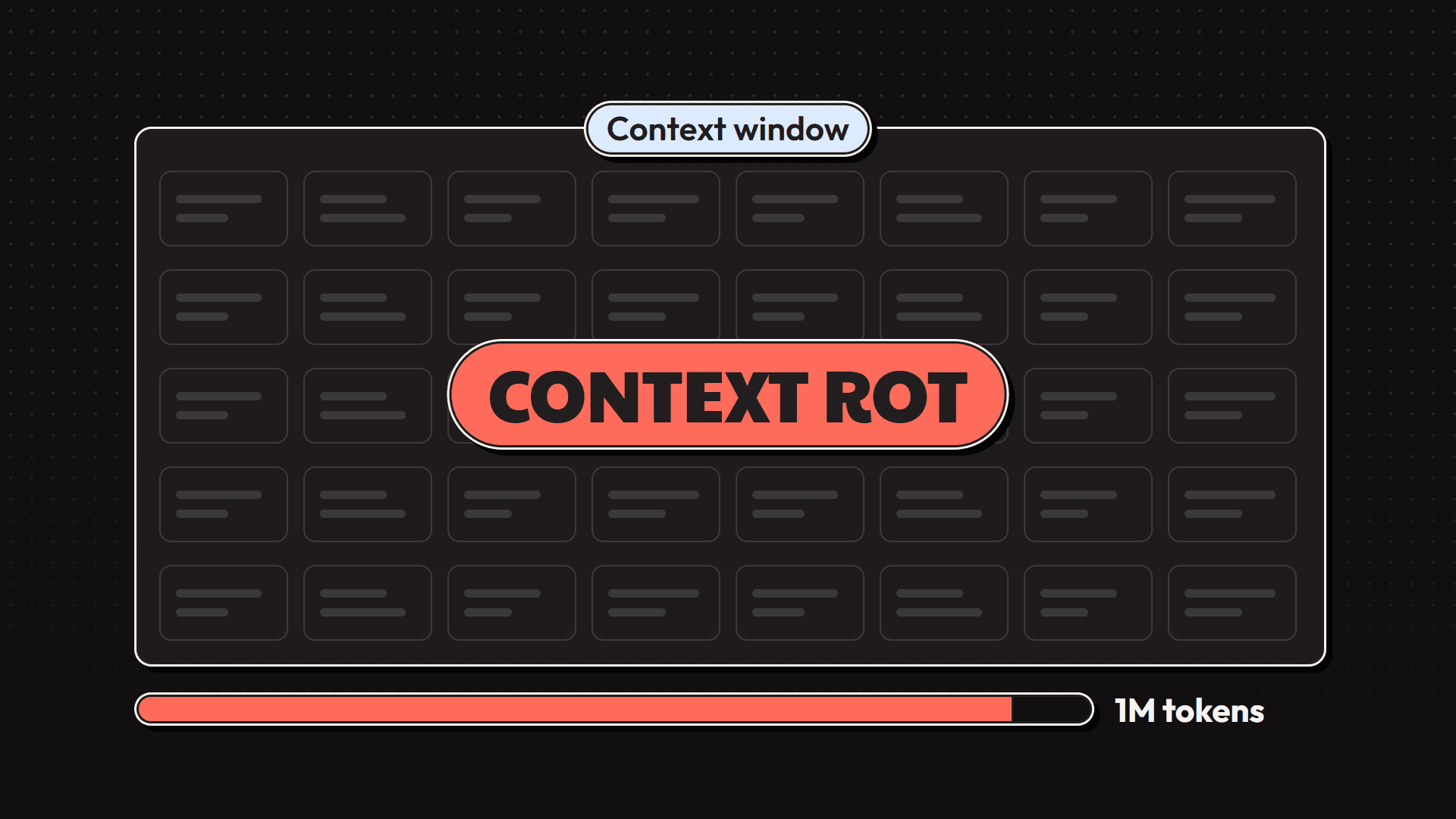
So harness engineering does not replace prompt engineering or context engineering. They are building blocks inside it.
🧰 What counts as the harness
The short definition: every piece of code, config and logic around the model. In practice that includes:
| Piece | What it does |
|---|---|
| Chat loop | Keeps the history and re-sends it, so the model can hold a conversation |
| System prompt | The standing instructions: role, rules, tone, output format |
| Context | Decides what information goes into the window at each step |
| Tools, skills and MCP servers | Things the agent can do, plus the short descriptions that tell the model when to use each one |
| Environment | The place it works in: a file system, a sandbox, a browser |
| Orchestration | Spinning up subagents, handing work between them, deciding which model does which job |
| Hooks | Code that runs automatically at certain moments, whatever the model decides |
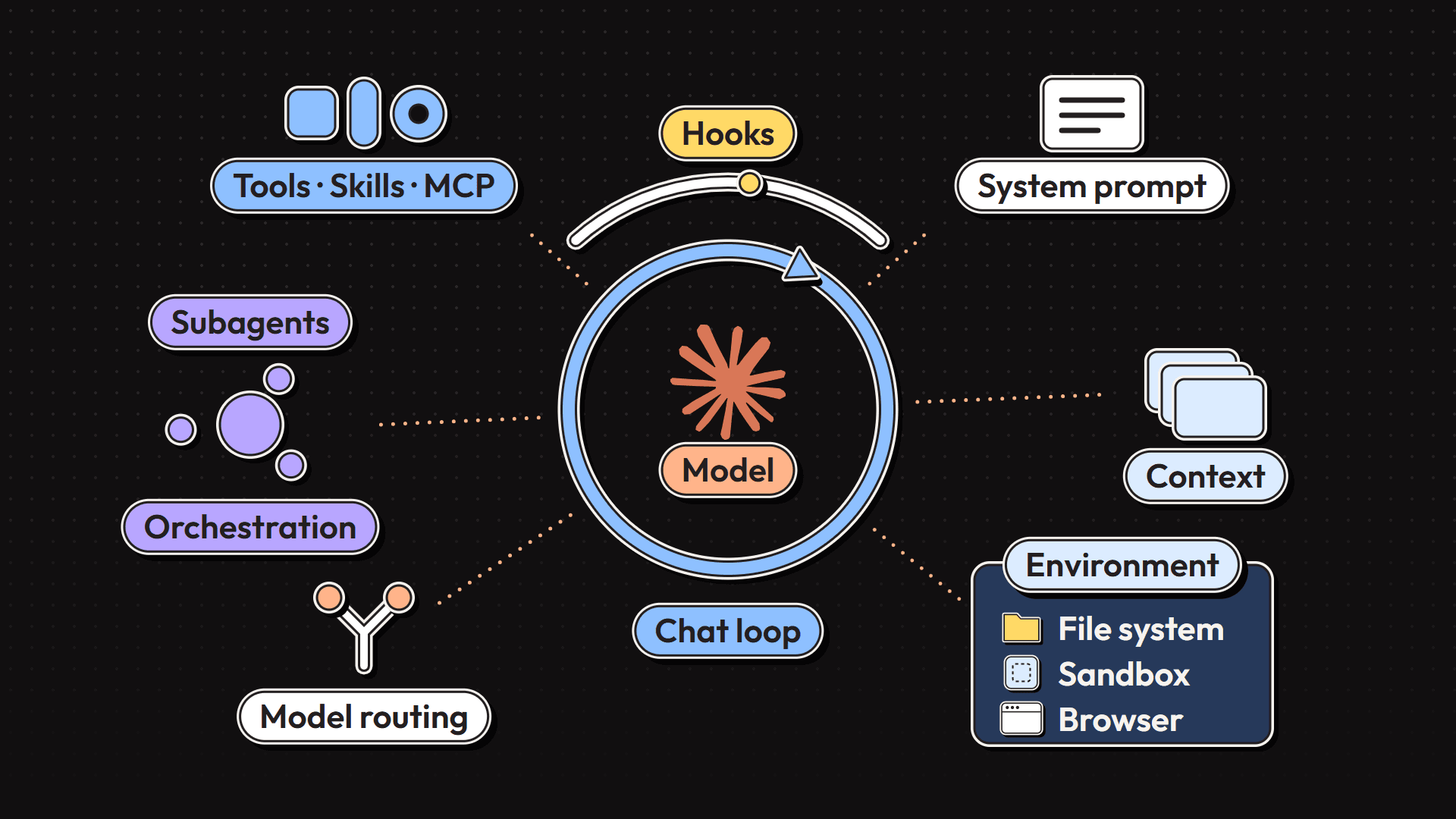
Two of these deserve a closer look.
Model routing is part of orchestration. Not every step needs the biggest, most expensive model. You don't hire a senior architect to rename a variable, so a good harness sends small jobs to small, cheap models and saves the big one for the hard parts.
Hooks are what make a harness reliable rather than hopeful. A hook might run a linter after every edit, or, as in Claude Code and Codex, compact the conversation automatically when the context is getting close to full. The model does not have to remember to do it. The harness just does it.
On its own, a model is just a model. It becomes an agent when the harness gives it memory, tools, a place to work, feedback and rules.
🚫 What a model can't do on its own
Out of the box, a model takes in text, images, maybe audio or video, and gives you back text. That is the whole job. On its own, a model:
- Can't remember you between chats.
- Can't run code.
- Doesn't know what happened last week.
- Can't set up its own environment or install anything.
Every one of those "abilities" you see in AI apps is really a harness feature. You can check this yourself in two minutes.
Try it: memory
- On claude.ai, make sure the memory feature is turned on.
- In one chat, tell Claude your favourite food.
- Open a brand-new chat and ask: "Do you know my favourite food?"
It knows. But the model did not suddenly remember anything, and it was not trained on your data. The model is exactly as forgetful as it was a minute ago. The app saved that fact and slipped it into the new chat's context. That is the harness.
Try it: web search
- Turn web search off and ask about something that happened last week. It can't help.
- Turn web search on and ask the same question. Now it can.
The model did not learn anything new between those two questions. The harness went and fetched the information.
🛠️ Designing a harness for a coding agent
So how do people actually design a harness? You work backwards:
- What do I want this agent to do?
- What does the harness need to give the model so it can do that?
Take the most popular example right now, a coding agent. If you want to see a real one mapped out, Claude Code Unpacked is an unofficial map of how Claude Code works under the hood. It is based on a snapshot, so some details may have changed, but its tool list is a good illustration: file tools, bash, web search, agents, planning. All of that is harness.
Here is the whole design on one board, then each row in detail.
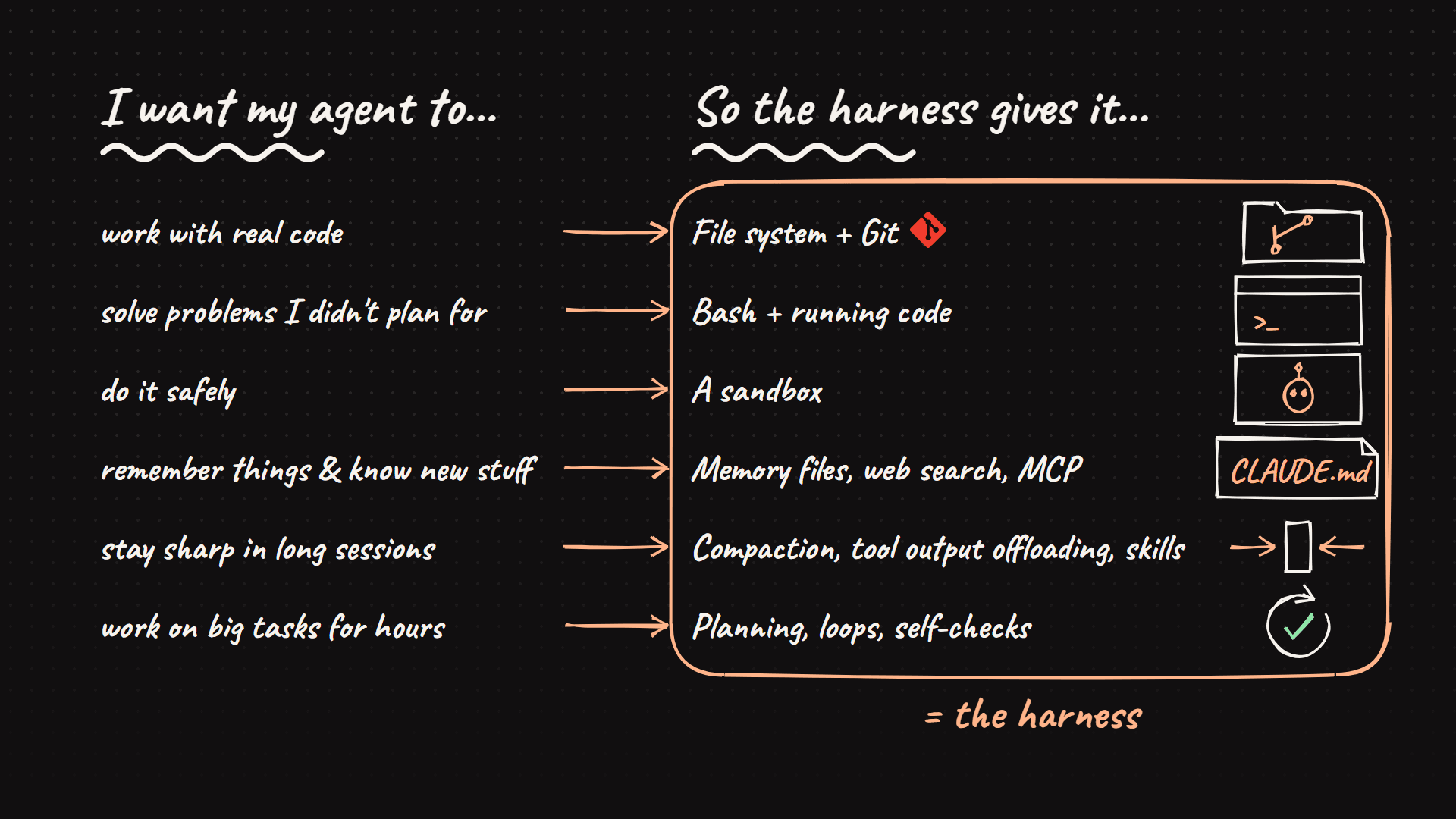
| I want my agent to... | So the harness gives it... |
|---|---|
| work with real code | A file system and Git |
| solve problems I didn't plan for | Bash and the ability to run code |
| do it safely | A sandbox |
| remember things and know new stuff | Memory files, web search, MCP |
| stay sharp in long sessions | Compaction, tool output offloading, skills |
| work on big tasks for hours | Planning, loops, self-checks |
📁 Work with real code: a file system and Git
The file system is probably the most important piece. It gives the agent somewhere to read code and docs, and somewhere to save its work as it goes instead of keeping everything in its head. Other agents, or people, can pick up from the same files.
Add Git on top and the agent can track changes, undo mistakes and try ideas on a separate branch.
💻 Solve problems you didn't plan for: bash
Instead of building a special tool for every single task, you hand the agent a computer. With bash and the ability to run code, it writes its own tools as it needs them.
📦 Do it safely: a sandbox
You don't want an agent running random code on your laptop. A sandbox is an isolated space where it can install things and break things without touching anything real.
🧠 Remember things and know new stuff: memory files, search and MCP
Memory files are plain files that get loaded at the start of every session: an AGENTS.md, or CLAUDE.md in Claude Code. That is how an agent "remembers" your project's conventions without being retrained. Web search and MCP tools cover anything that needs to be up to date.
✂️ Stay sharp in long sessions: fighting context rot
Remember context rot? The harness fights it in three ways:
- Compaction summarizes older parts of the conversation so the window does not fill with stale material.
- Tool output offloading saves huge tool outputs to a file instead of flooding the conversation. Claude Code, for example, writes large outputs to a temporary file and cleans it up once the goal is done.
- Skills only load their full instructions when they are actually needed, instead of stuffing everything into the context at the start.
🔁 Work on big tasks for hours: planning, loops and self-checks
For long tasks, an agent needs a plan, a way to check its own work and a way to keep going. That is where the loop comes in.
🔄 The Ralph loop: how agents keep going
One pattern worth knowing by name is the Ralph loop. It works like this:
- The agent tries to stop early and declare the job done.
- A hook catches it and blocks the exit.
- The harness sends it back in with a fresh context and the original goal.
- Its progress is saved in files, such as a
progress.md, so it picks up right where it left off. - Tests run automatically. If something fails, the error goes straight back to the model to fix.
- Only when the checks pass does the exit open.
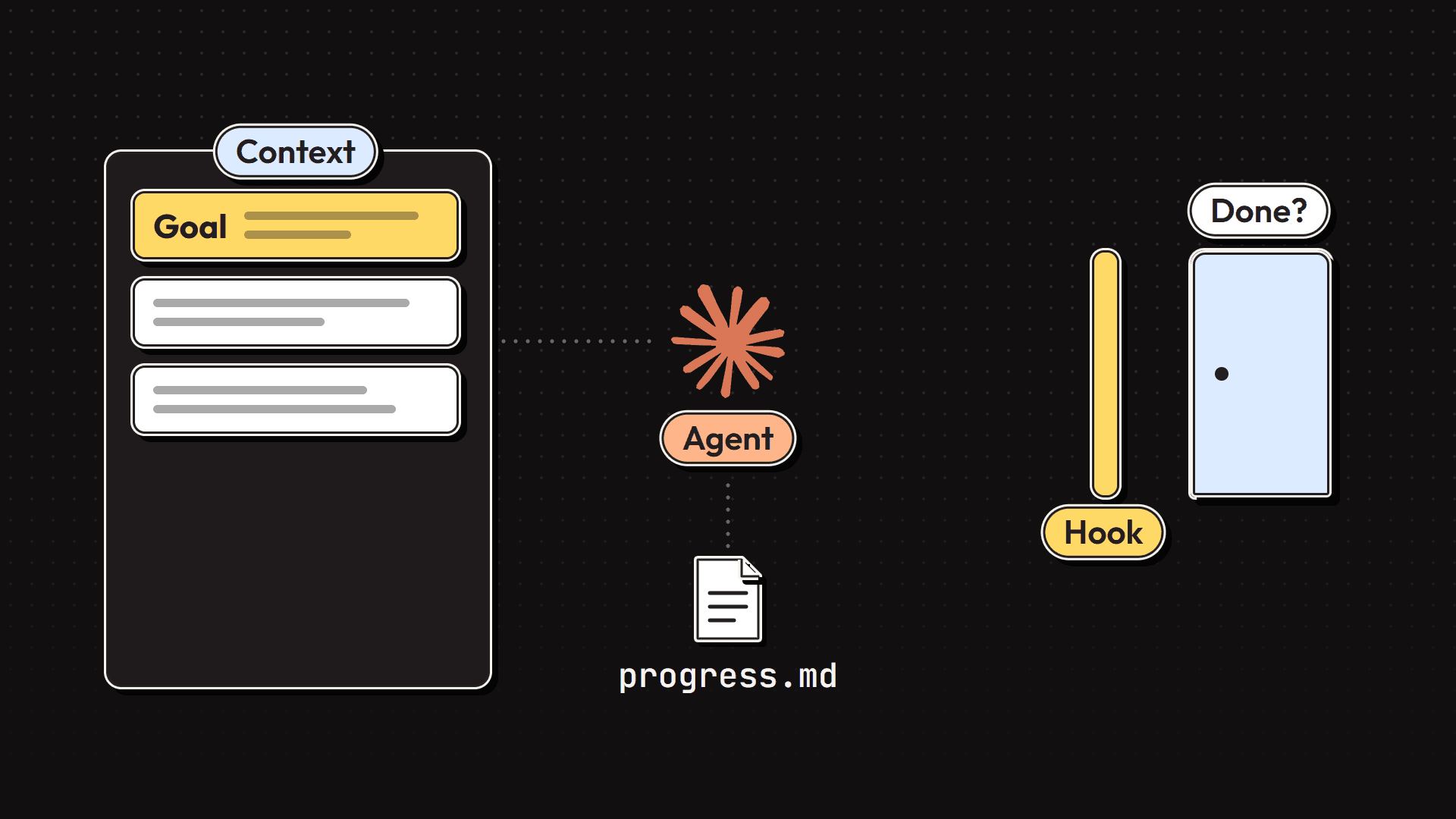
Notice that this uses almost every piece from the earlier sections at once: hooks, context management, the file system and self-checks. That combination is what lets an agent work on something for hours without drifting.
Claude Code itself runs on the same basic loop. Your message goes in, the model answers, and if it wants to use a tool, the harness runs that tool and feeds the result back. Round and round until the job is done.
📊 The proof: same model, different harness
Back to that benchmark. Terminal Bench 2.0 gives agents real tasks to complete in a terminal. Here are the Claude Opus 4.6 rows from its leaderboard, captured on 27 September 2026:
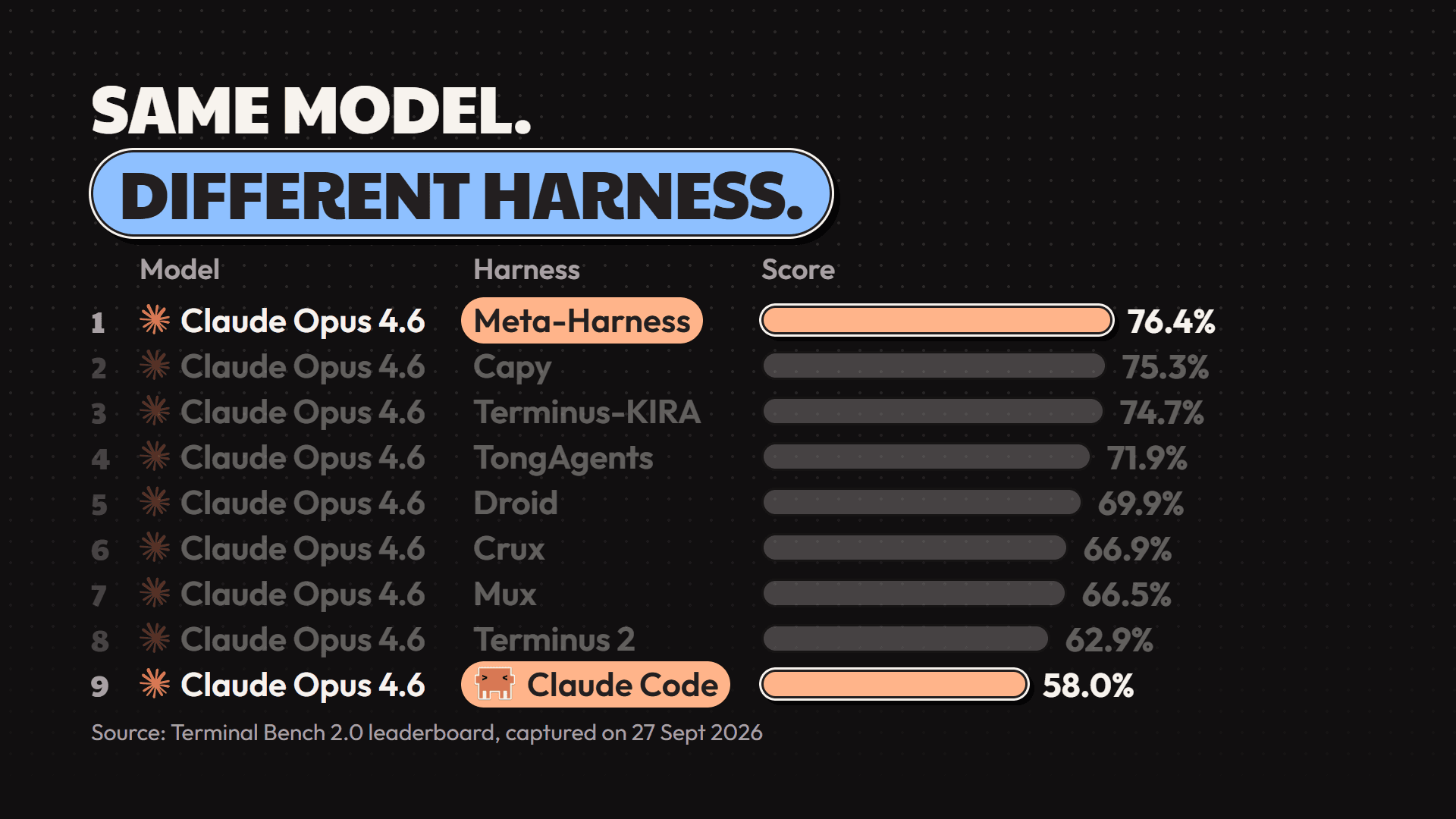
| Rank | Harness | Score |
|---|---|---|
| 1 | Meta-Harness | 76.4% |
| 2 | Capy | 75.3% |
| 3 | Terminus-KIRA | 74.7% |
| 4 | TongAgents | 71.9% |
| 5 | Droid | 69.9% |
| 6 | Crux | 66.9% |
| 7 | Mux | 66.5% |
| 8 | Terminus 2 | 62.9% |
| 9 | Claude Code | 58.0% |
Every row is the same model. The only thing that changes is the harness, and the gap between the top and the bottom is more than 18 points. Leaderboards move, so check the live Terminal Bench 2.0 leaderboard for current numbers.
So when someone says "just use the best model", that is half the story. The same model can do a lot better, or a lot worse, depending on what you build around it.
🔮 Will harnesses matter less as models improve?
Some parts, probably yes. Models will get better at planning and checking their own work, so the harness won't need to hold their hand as much.
But I don't think the harness goes away. We still write prompts, even though models are miles ahead of where they were in 2023. A good workspace, the right tools, memory and a way to check your work help any model, however smart it is. Honestly, the same as they'd help any of us.
❓ Quick answers
What is harness engineering? Designing everything around an AI model that turns it into a useful agent: its instructions, context, tools, environment, memory, orchestration, hooks and loops.
What is an agent harness? The code, config and logic that wraps a model. Claude Code, Codex and opencode are all harnesses. The model inside them can be swapped; the harness is what decides how the model gets used.
Is harness engineering the same as context engineering? No. Context engineering, deciding what the model sees at each step, is one part of harness engineering. Prompt engineering is another. The harness also covers tools, environment, orchestration, hooks and loops.
What is context rot? The drop in quality when a model's context window fills up with material that isn't relevant to the task. Compaction, tool output offloading and on-demand skills are common ways a harness fights it.
What is the Ralph loop? A pattern where the harness stops an agent from quitting early, restarts it with a fresh context and the original goal, lets it resume from progress saved in files, and feeds failing test results back until the work passes.
🧭 Where to go from here
Next time you see a shiny new agent, don't just ask which model it uses. Ask what's built around it.
The next two pieces in this series go hands-on: building a harness without a framework, and then building one with a framework. Subscribe on YouTube so you catch them.
7:36Want the visual version?Watch the 7:36 videoWatch on YouTube Get the next guide by email
New guides and videos, nothing else. No launch roundups.